Why My First $3.49 GPU Hour Served Zero Tokens
#1111:21 video9 min readcoming soon
#vllm#sglang#llm-serving#gpu-rental#h100#kv-cache
Chapters
Each chapter opens the video at its time once the video is on YouTube.
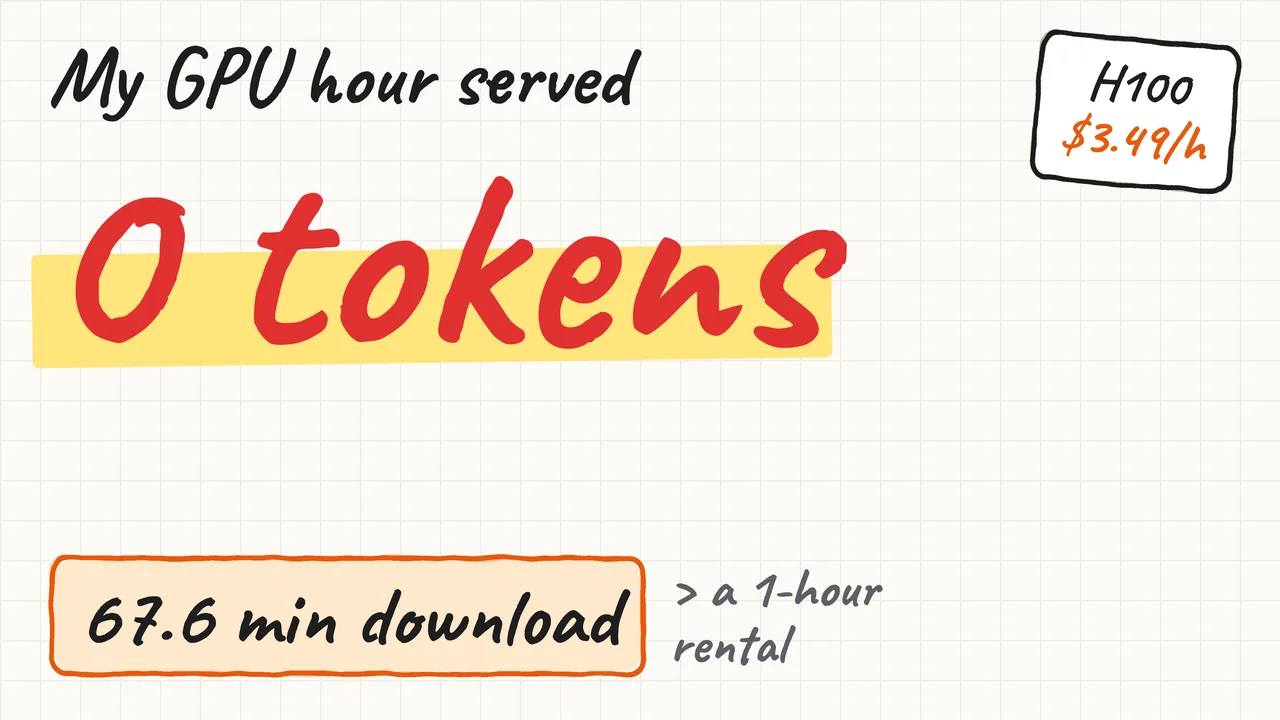
Management gives you one rented GPU hour and $5 to $10, to test if serving a model yourself costs less than a hosted API. The hour on an H100 ends without an error, and the server has served zero tokens. This video follows that hour, and the next one, to one honest number.
Read it instead
The full lesson in writing, with the diagrams from the video, for anyone who prefers to read.
Management gives you one rented GPU hour and $5 to $10, to test if serving a model yourself costs less than a hosted API. The hour on an H100 ends without an error, but your server has served zero tokens. So where did the hour go, and how do you get one honest number out of the next one?
Three questions follow: where the hour went, why the server crashed, and which number to trust.
1. Where did the hour go?#
The hour went to a download, because a rented GPU bills from the moment it starts.
The situation#
You picked the cheapest H100 on the marketplace, at $3.49 an hour, and pasted your launch command. It starts vLLM, an open-source serving engine, which first downloads the model weights, 140 GB of numbers that make up the model.
The picture#
The provider bills from the moment your container, the software environment on the rented machine, starts until you stop it. The GPU sits idle through the image pull, which copies the engine software, then the weight download and the engine load. The download span depends on the machine's own network link, so your office connection does not matter once you rent.
Think it through#
The listing says the provider measured this machine's download speed, its downlink, at 276 Mbps. How much of the one-hour rental is left after a 140 GB download?
A first thought is most of the hour, because a data-center machine should download fast.
That is reasonable for a fast machine, but 276 megabits is only 34.5 megabytes a second, and the clock runs throughout.
So the real question is how many billed minutes pass before the server can answer its first request.
The mechanism, step by step#
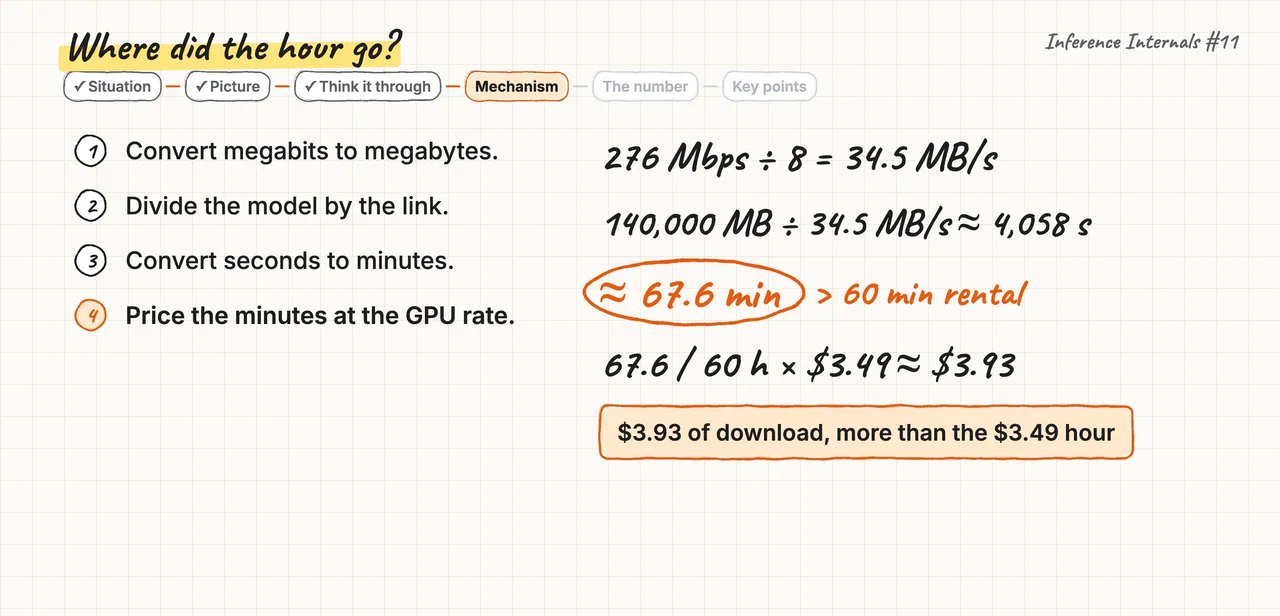
- Divide 276 megabits per second by 8 bits per byte, which gives 34.5 megabytes per second.
- Divide 140,000 megabytes by 34.5 megabytes per second, which gives about 4,058 seconds.
- That is 67.6 minutes, so the download alone is longer than the whole rental.
- At $3.49 an hour those 67.6 minutes would cost $3.93, more than the hour itself.
The number#
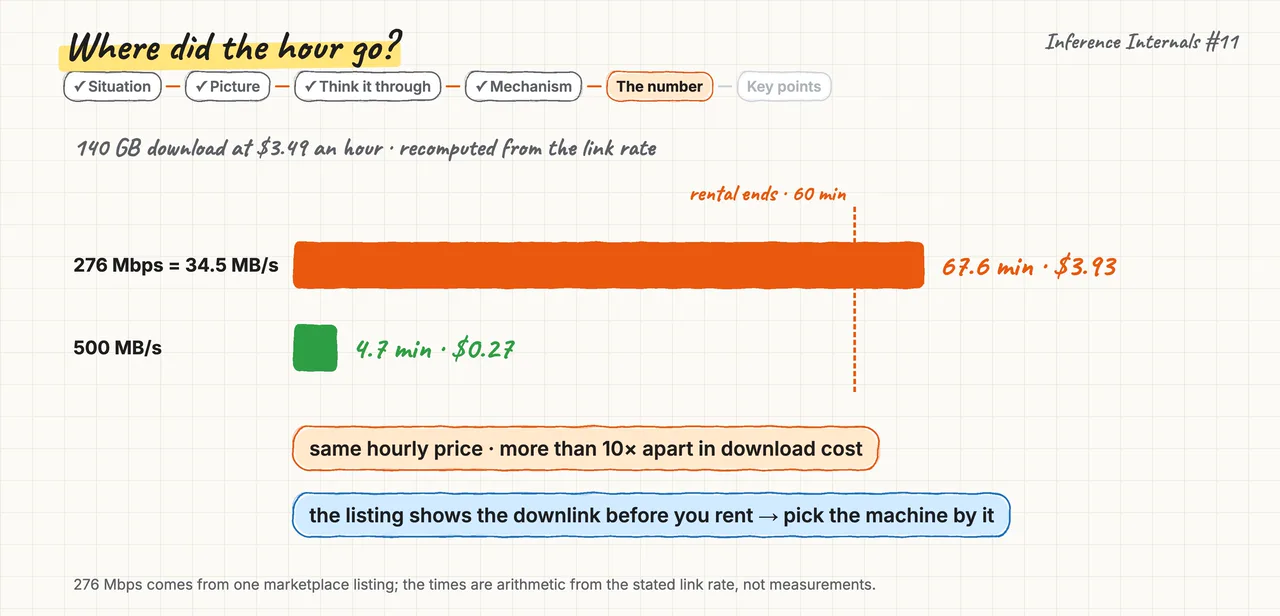
On a listing with a 500 megabytes per second link, the same download takes 4.7 minutes and costs $0.27. So two machines at the same hourly price differ more than ten times in download cost before any benchmark runs. The listing shows the measured downlink before you rent, so you can price the download and pick the machine by it.
Key points#
- Remember. Billing starts at container start, so price the download from the listing's measured downlink before you rent.
- The trap. Believing the download is free, which on a slow link spends the whole rental before the server starts.
- Try this. Divide your model's megabytes by the listing's downlink, and compare the minutes with your rental.
So for the next hour you pick a listing with a fast link and a smaller model. 140 GB of weights would not fit in the H100's 80 GB of memory anyway. So you start with Qwen3-8B, a model with 16 GB of weights. A small model keeps each mistake cheap, and at 500 megabytes per second its download takes about 32 seconds. You launch the server, the weights load, and then the engine exits with an out-of-memory error before it serves one request.
2. Why did the server crash?#
That crash is a memory budget that did not add up, and vLLM's error prints the value that fixes it.
The situation#
The engine loaded the weights and exited during startup, before any request, and the GPU is still billing you.
The picture#
The engine sets up GPU memory once, at startup, so a memory shortage shows up before the first request. The weights load first, and the engine keeps what remains for the KV cache. The KV cache stores the attention keys and values for each token of each running request. A request's context is the number of tokens it can hold, so a longer context needs more KV cache. The memory fraction is the share of total GPU memory the engine may use. The weights and the KV cache for your context must fit under that fraction together, and that is the budget.
Think it through#
Your server exited at startup with a KV cache memory error, before any request. Does this error mean your GPU is too small?
A first thought is yes, because out of memory usually means the machine cannot hold the job.
That is reasonable for a crash under load, but this budget was set at startup, before any load arrived.
So the real question is which part of the budget did not fit, the weights or your context.
The mechanism, step by step#
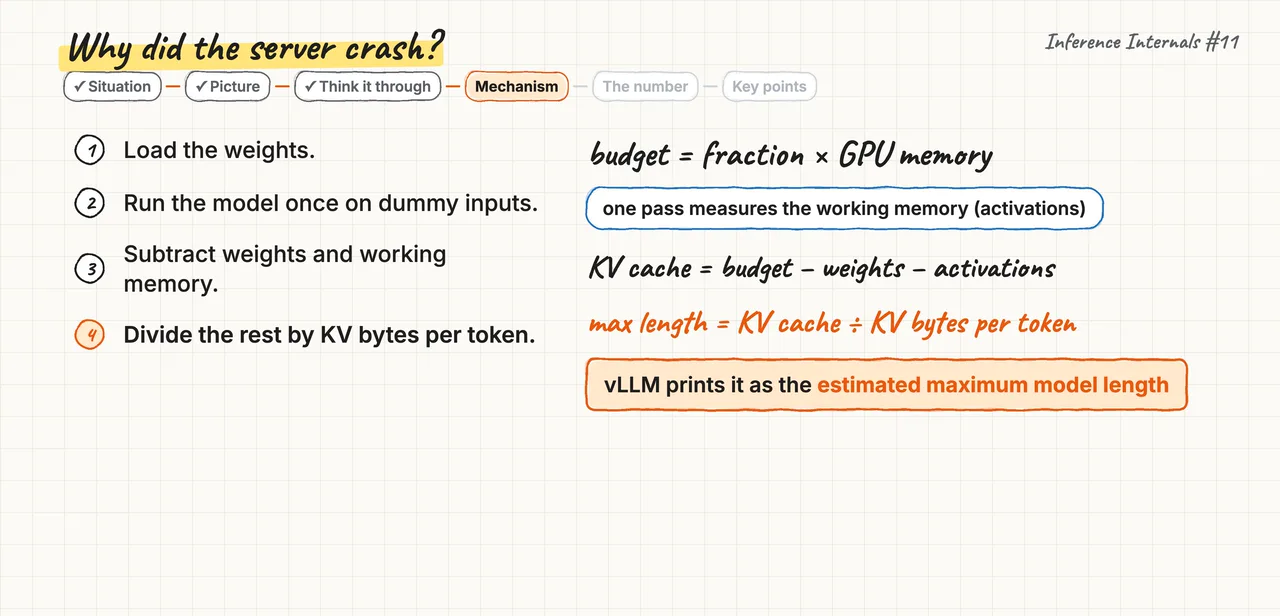
- The engine loads the weights first, because their size is fixed and known.
- It runs the model once on dummy inputs, to measure the working memory one pass needs.
- It subtracts the weights and that working memory from the budget, and the rest is the KV cache.
- It divides the rest by the KV bytes one token needs, so it knows the longest context that fits. If you asked for more context than that, vLLM stops and prints the length that fits, as the estimated maximum model length.
The number#
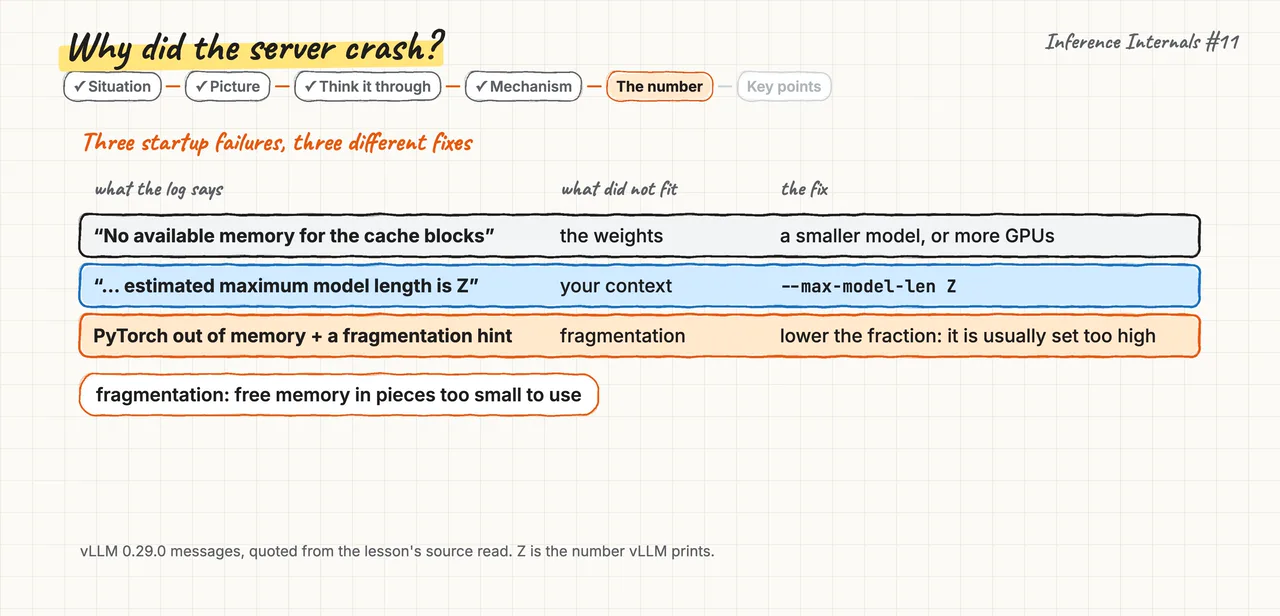
Take Qwen3-8B on the 80 GB H100, with the fraction set to 0.25, which gives a 20 GB budget. One token of KV cache costs 147,456 bytes, so the model's full 40,960-token context needs about 6.0 GB. That does not fit beside 16 GB of weights inside 20 GB, because only about 4 GB remain. So vLLM prints a length that fits, at most about 27,000 tokens, because the working memory also takes space. You set the max model len flag, the launch setting for the longest context, to that number. If vLLM says no available memory for the cache blocks, the weights filled everything, so use a smaller model or more GPUs. If it names an estimated maximum model length, as here, the printed number is the fix. If PyTorch, the library under the engine, reports fragmentation, free memory in pieces too small to use, lower the fraction.
Key points#
- Remember. A startup memory failure is a budget equation, and vLLM's error prints the value to set.
- The trap. Reading out of memory at startup as a small GPU, which buys a bigger rental for one wrong value.
- Try this. Start with max model len auto, and write the length it logs into your launch command.
You set max model len to the value the error printed, and this time the server starts. It answers its first request, and about twenty billed minutes are left for the number management asked for.
3. Which number can you trust?#
Before you measure, know that only a configuration, an engine with its flags, is faster, and only on one workload.
The situation#
As you start, a colleague forwards a blog that says engine B is 2x faster than the engine you are running. Management asks whether you are testing the wrong engine, and which of the two numbers to trust.
The picture#
A serving benchmark is two curves, measured as you raise concurrency, the number of requests in flight at once. Output tokens per second, the throughput, rises and then flattens, because past some load the GPU has no idle cycles left. TTFT p99, the time to first token that one request in a hundred exceeds, keeps rising the whole way. The plateau is where throughput flattens, so it is the server's capacity, and you report the TTFT p99 at that same point.
Think it through#
One engine's own tool records 2,900 output tokens per second, and the other engine's tool records 1,400. Which engine do you trust with a year of traffic?
A first thought is the first engine, because 2,900 is about twice 1,400.
That is reasonable if only the engine changed, but the client, the flags and the traffic changed with it.
So the real question is what else differs between the two runs, besides the engine.
The mechanism, step by step#
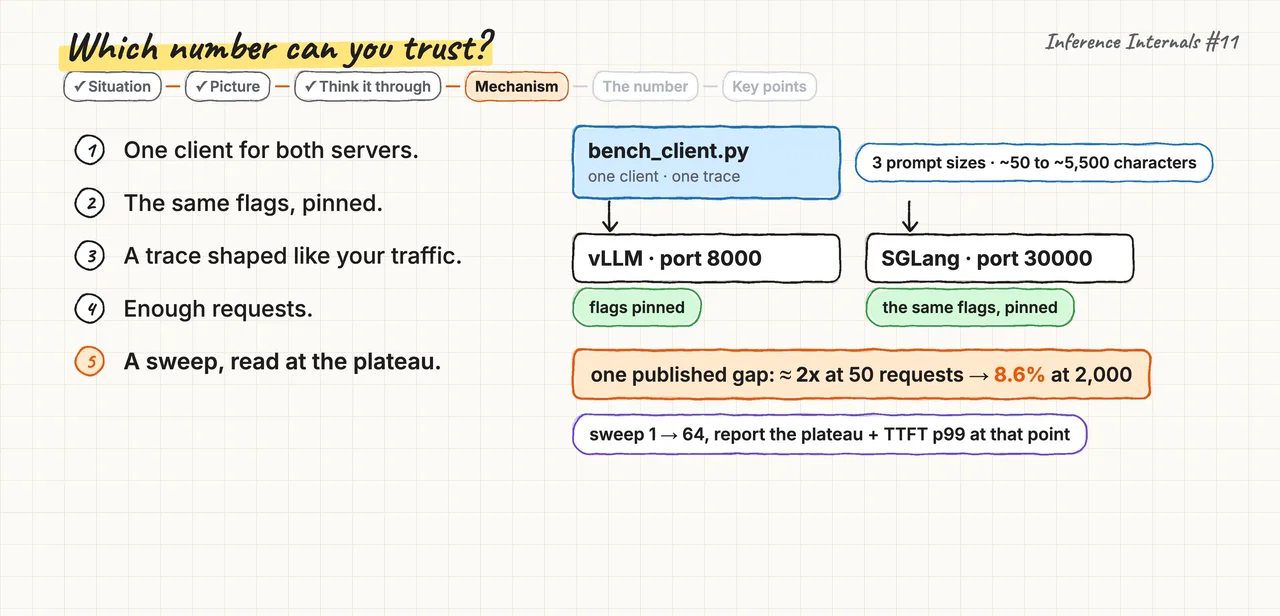
- Use one client for both servers, because each engine's own tool sends and times requests in its own way.
- Pin the same flags on both, because each engine picks its own defaults at startup from the GPU it finds.
- Replay a trace, a file of requests shaped like your traffic, because reading a prompt costs more as it grows.
- Send enough requests, because one published gap of about 2x at 50 requests shrank to 8.6% at 2,000.
- Sweep the concurrency and read the plateau, because one level may sit on the rising part of the curve.
The number#
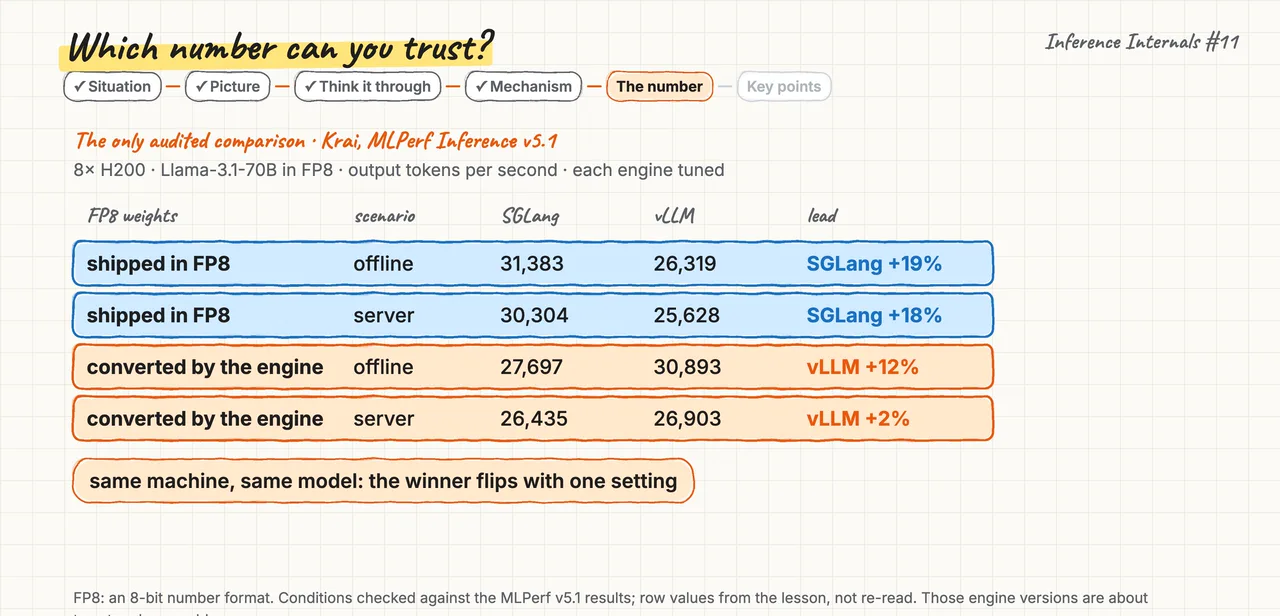
The only audited comparison is one MLPerf submission, where an outside body checked the rules, on eight H200 GPUs. On weights shipped already in FP8, an 8-bit number format, SGLang led by 18 to 19%. When the engine converted the weights to FP8 itself, vLLM led by 2 to 12% instead. So the winner flipped with one setting, on the same machine and the same model.
Key points#
- Remember. Only a configuration is faster, on one workload, so compare with one client, pinned flags, your traffic and the plateau.
- The trap. Two tools, two sets of defaults and one number each compare four things at once.
- Try this. Check any engine benchmark for three names, the client, the flags and the request count.
The plateau gives you the number management asked for, once you turn it into cost per million tokens. Divide the GPU's price per hour by the tokens the plateau serves in one hour, then multiply by one million. That cost sits next to the hosted API's price per million tokens, so it is the honest number your next hour returns. Whether your number beats the API price is the question the next video answers.
Recap#
- Billing starts at container start, so price the download from the listing's measured downlink before you rent.
- A startup memory failure is a budget equation, and vLLM's error prints the value to set.
- Only a configuration is faster, on one workload, so compare with one client, pinned flags, your traffic and the plateau.